New
New

Template Setup

BOOKMARK
Save on this device

CMS Collections Setup

MokuDocs uses separate CMS collections so content stays structured, reusable, and maintainable over time.

At the core of the template are three collections:

1. Categories

These define the top-level organisation of the site and power browsing across the docs hub and side navigation.

Use Categories for:

  • section names

  • navigation grouping

  • category descriptions

  • category ordering

2. Docs

These are the individual documentation pages your readers visit.

Use Docs for:

  • page title

  • slug

  • summary or intro

  • category reference

  • publish/update status

  • metadata such as tags or visibility

3. Doc Blocks

These handle reusable technical content that is hard to manage cleanly inside one long Rich Text field.

Use Doc Blocks for:

  • code snippets

  • structured tables

  • callouts and notes

  • image references

  • repeatable technical patterns

Why this model works

This separation keeps authorship flexible while preserving structure. It also helps teams maintain consistency across growing documentation sets.

Common setup mistakes

  • creating docs before categories are defined

  • using inconsistent slugs

  • treating Doc Blocks as a dumping ground for regular prose

  • duplicating content instead of reusing blocks where repeatability matters

If you are configuring the template for the first time, start with a small real dataset rather than trying to migrate everything at once.

Helpful resources

Need a refresher on how Framer CMS works? These official lessons cover the basics behind collections, fields, and dynamic content.
What is the Framer CMS?

CMS collections, items & fields

CMS pages & dynamic content

Collection structure

CollectionWhat it controlsRequired fieldsNotes
CategoriesTop-level browsing and side navigation groupingTitle, Slug, OrderKeep category names short and clear
DocsIndividual documentation pagesTitle, Slug, Category, SummaryThis is the main content layer readers see
Doc BlocksReusable technical sectionsBlock Type, Title, ContentBest for code, tables, callouts, and media

Collection structure

CollectionWhat it controlsRequired fieldsNotes
CategoriesTop-level browsing and side navigation groupingTitle, Slug, OrderKeep category names short and clear
DocsIndividual documentation pagesTitle, Slug, Category, SummaryThis is the main content layer readers see
Doc BlocksReusable technical sectionsBlock Type, Title, ContentBest for code, tables, callouts, and media

Collection structure

CollectionWhat it controlsRequired fieldsNotes
CategoriesTop-level browsing and side navigation groupingTitle, Slug, OrderKeep category names short and clear
DocsIndividual documentation pagesTitle, Slug, Category, SummaryThis is the main content layer readers see
Doc BlocksReusable technical sectionsBlock Type, Title, ContentBest for code, tables, callouts, and media
json
{
  "categories": [
    {
      "title": "Getting Started",
      "slug": "getting-started",
      "order": 1
    }
  ],
  "docs": [
    {
      "title": "Welcome",
      "slug": "welcome",
      "category": "Getting Started",
      "summary": "Start here to understand how MokuDocs works."
    }
  ],
  "docBlocks": [
    {
      "type": "table",
      "title": "Collection structure"
    }
  ]
}
json
{
  "categories": [
    {
      "title": "Getting Started",
      "slug": "getting-started",
      "order": 1
    }
  ],
  "docs": [
    {
      "title": "Welcome",
      "slug": "welcome",
      "category": "Getting Started",
      "summary": "Start here to understand how MokuDocs works."
    }
  ],
  "docBlocks": [
    {
      "type": "table",
      "title": "Collection structure"
    }
  ]
}
json
{
  "categories": [
    {
      "title": "Getting Started",
      "slug": "getting-started",
      "order": 1
    }
  ],
  "docs": [
    {
      "title": "Welcome",
      "slug": "welcome",
      "category": "Getting Started",
      "summary": "Start here to understand how MokuDocs works."
    }
  ],
  "docBlocks": [
    {
      "type": "table",
      "title": "Collection structure"
    }
  ]
}

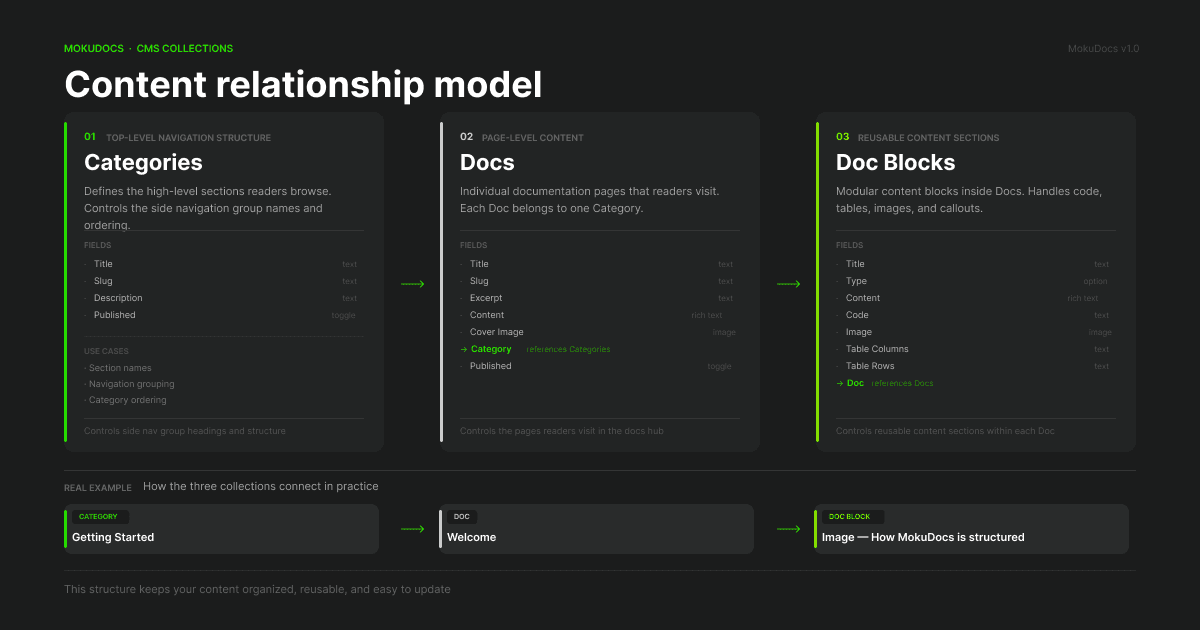
Content relationship model

Diagram showing relationships between CMS Categories, Docs, and Doc Blocks

Treat Categories, Docs, and Doc Blocks as separate but connected systems rather than one large content collection.

Content relationship model

Diagram showing relationships between CMS Categories, Docs, and Doc Blocks

Treat Categories, Docs, and Doc Blocks as separate but connected systems rather than one large content collection.

Content relationship model

Diagram showing relationships between CMS Categories, Docs, and Doc Blocks

Treat Categories, Docs, and Doc Blocks as separate but connected systems rather than one large content collection.

© 2026 MokuDocs. Powered by Mokujiro Studio.

© 2026 MokuDocs. Powered by Mokujiro Studio.

© 2026 MokuDocs. Powered by Mokujiro Studio.

Create a free website with Framer, the website builder loved by startups, designers and agencies.