New
New

Getting Started

BOOKMARK
Save on this device

Welcome

Start here to understand how MokuDocs is structured and how to make it your own.

MokuDocs is a CMS-driven documentation template for Framer built for teams that want clear navigation, reusable content patterns, and a system that can grow with their documentation. It is well suited to product docs, internal knowledge bases, release notes, onboarding guides, and support content.

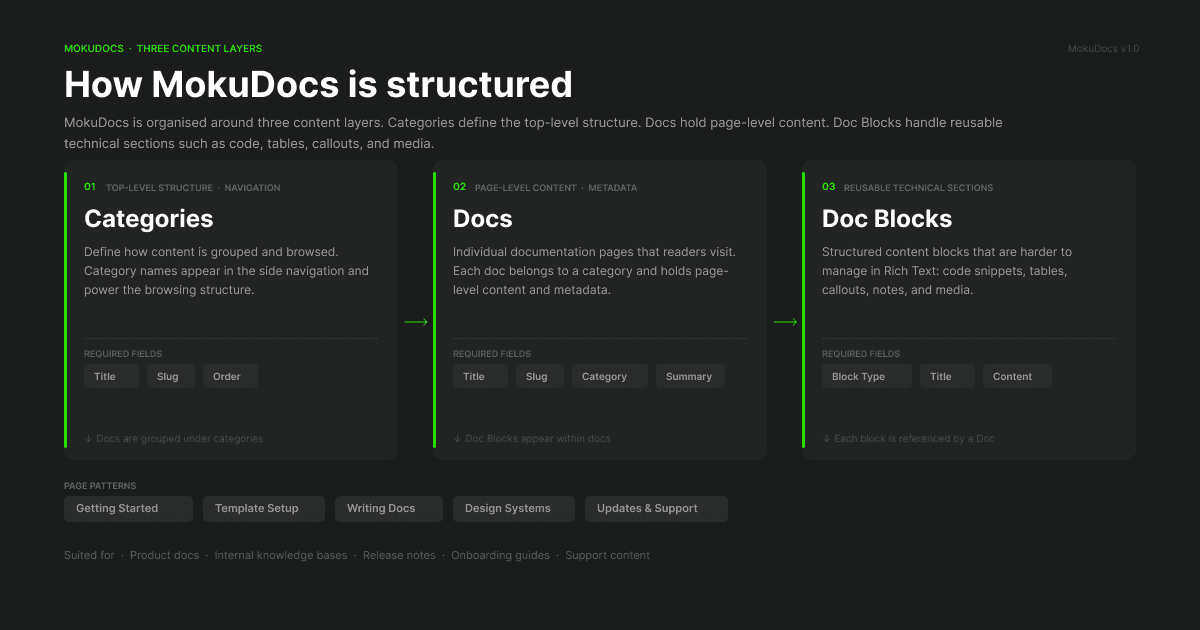
The template is organised around three content layers:

  • Categories define the top-level browsing structure

  • Docs hold page-level content and metadata

  • Doc Blocks handle reusable technical sections such as code snippets, tables, notes, and media

This structure gives you more control than relying on a single long Rich Text field. It also makes the system easier to scale as your docs library grows.

You can use MokuDocs in two ways. Some teams keep these pages as a private implementation guide while customising the template. Others replace the example content entirely and use the same structure for public-facing documentation. Many do both.

If you are setting up the template for the first time, read these pages next:

  1. Quick Start Checklist

  2. Information Architecture

  3. CMS Collections Setup

  4. Using Doc Blocks

That sequence will give you the minimum context needed to publish your first working docs site confidently.

Helpful resources

If you are completely new to Framer, these official Framer Academy lessons are a great place to learn the basics before customizing Mokudocs.
Framer Fundamentals

Framer CMS Basics

Included page patterns

Page TypePurposeBest For
Getting StartedHelps new users understand the structure quicklyFirst-time buyers and implementers
Template SetupExplains CMS model, URLs, and content relationshipsDesigners and builders
Writing DocsDefines writing, media, and reusable block patternsContent owners
Design SystemsDocuments navigation, TOC, typography, and code stylingDesign and product teams
Updates & SupportCovers release notes, changelog, roadmap, and troubleshootingOngoing maintenance

Included page patterns

Page TypePurposeBest For
Getting StartedHelps new users understand the structure quicklyFirst-time buyers and implementers
Template SetupExplains CMS model, URLs, and content relationshipsDesigners and builders
Writing DocsDefines writing, media, and reusable block patternsContent owners
Design SystemsDocuments navigation, TOC, typography, and code stylingDesign and product teams
Updates & SupportCovers release notes, changelog, roadmap, and troubleshootingOngoing maintenance

Included page patterns

Page TypePurposeBest For
Getting StartedHelps new users understand the structure quicklyFirst-time buyers and implementers
Template SetupExplains CMS model, URLs, and content relationshipsDesigners and builders
Writing DocsDefines writing, media, and reusable block patternsContent owners
Design SystemsDocuments navigation, TOC, typography, and code stylingDesign and product teams
Updates & SupportCovers release notes, changelog, roadmap, and troubleshootingOngoing maintenance

How MokuDocs is structured

Hierarchy diagram showing Categories, Docs, and Doc Blocks architecture

Categories define the top-level structure, Docs hold page-level content, and Doc Blocks handle reusable technical sections such as tables, code, notes, and media. Suggested image Simple diagram: Categories → Docs → Doc Blocks

How MokuDocs is structured

Hierarchy diagram showing Categories, Docs, and Doc Blocks architecture

Categories define the top-level structure, Docs hold page-level content, and Doc Blocks handle reusable technical sections such as tables, code, notes, and media. Suggested image Simple diagram: Categories → Docs → Doc Blocks

How MokuDocs is structured

Hierarchy diagram showing Categories, Docs, and Doc Blocks architecture

Categories define the top-level structure, Docs hold page-level content, and Doc Blocks handle reusable technical sections such as tables, code, notes, and media. Suggested image Simple diagram: Categories → Docs → Doc Blocks

© 2026 MokuDocs. Powered by Mokujiro Studio.

© 2026 MokuDocs. Powered by Mokujiro Studio.

© 2026 MokuDocs. Powered by Mokujiro Studio.

Create a free website with Framer, the website builder loved by startups, designers and agencies.