Writing Docs

BOOKMARK
Save on this device

Using Doc Blocks

Doc Blocks are one of the core features that make MokuDocs more flexible than a documentation system built from a single Rich Text field.

While standard text content works well for narrative explanation, technical documentation often needs structured, repeatable components. Doc Blocks make those sections easier to manage, easier to reuse, and more consistent across pages.

When to use Doc Blocks

Use Doc Blocks when the content needs to be:

  • reused in more than one place

  • presented in a structured format

  • edited independently from page body copy

  • kept visually consistent across multiple docs

Typical block types

  • code snippets

  • tables

  • notes and callouts

  • screenshots and diagrams

  • technical references

When not to use them

Do not use Doc Blocks for every paragraph. Standard page copy should stay in the main content area. Blocks are most useful when structure and reuse matter.

Why buyers care

For teams maintaining product documentation over time, reusable blocks reduce duplication and make updates easier. That is one of the main advantages of the MokuDocs content model.
When to use each block

Block TypeUse It ForAvoid Using It For
Code BlockCode snippets, config, embed examplesLong narrative explanation
Table BlockComparisons, settings, field referencesDense paragraphs
Image BlockScreenshots, diagrams, flow visualsDecorative filler images
Note / CalloutWarnings, tips, constraintsCore page content that should stay in the main body

When to use each block

Block TypeUse It ForAvoid Using It For
Code BlockCode snippets, config, embed examplesLong narrative explanation
Table BlockComparisons, settings, field referencesDense paragraphs
Image BlockScreenshots, diagrams, flow visualsDecorative filler images
Note / CalloutWarnings, tips, constraintsCore page content that should stay in the main body

When to use each block

Block TypeUse It ForAvoid Using It For
Code BlockCode snippets, config, embed examplesLong narrative explanation
Table BlockComparisons, settings, field referencesDense paragraphs
Image BlockScreenshots, diagrams, flow visualsDecorative filler images
Note / CalloutWarnings, tips, constraintsCore page content that should stay in the main body

Example Doc Block entry

json
{
  "type": "code",
  "title": "Install the search component",
  "language": "bash",
  "content": "npm install @mokudocs/search"
}

Example Doc Block entry

json
{
  "type": "code",
  "title": "Install the search component",
  "language": "bash",
  "content": "npm install @mokudocs/search"
}

Example Doc Block entry

json
{
  "type": "code",
  "title": "Install the search component",
  "language": "bash",
  "content": "npm install @mokudocs/search"
}

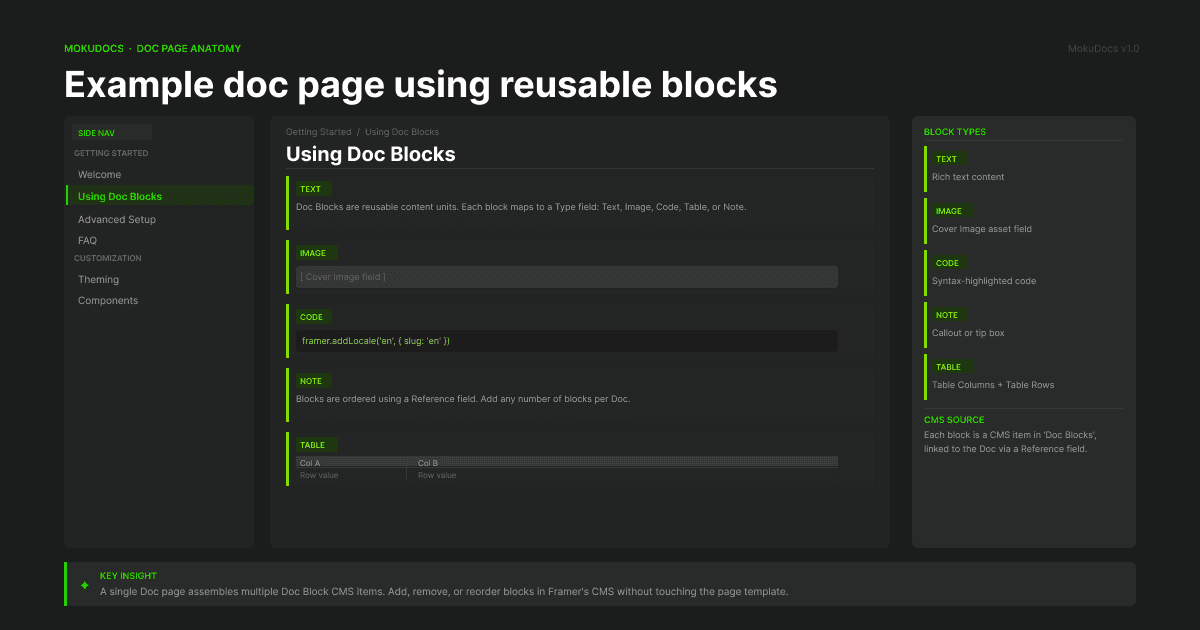
Example doc page using reusable blocks

Documentation page showing body copy, table block, code block, and image block

Reusable blocks help technical content stay consistent across multiple pages without forcing everything into one Rich Text field.

Example doc page using reusable blocks

Documentation page showing body copy, table block, code block, and image block

Reusable blocks help technical content stay consistent across multiple pages without forcing everything into one Rich Text field.

Example doc page using reusable blocks

Documentation page showing body copy, table block, code block, and image block

Reusable blocks help technical content stay consistent across multiple pages without forcing everything into one Rich Text field.

© 2026 MokuDocs. Powered by Mokujiro Studio.

© 2026 MokuDocs. Powered by Mokujiro Studio.

© 2026 MokuDocs. Powered by Mokujiro Studio.

Create a free website with Framer, the website builder loved by startups, designers and agencies.